PHI ALPHA THETA - 2025 Retrospective
Live Demo

Loading demo...

A New Chapter Begins

Making History - A Year of Digital Transformation

The Vision

Building more than a database - creating a complete engagement platform

The Solution

Fully integrated, native member management platform

Member Management

Streamlined profiles, onboarding, and member interactions

Certificate System

Automated certificate generation and tracking

Chapter Management

Complete chapter analytics and member oversight

Website Overhaul

Custom design, real-time search, native events

Impact & Results

Quantifiable success: time saved, costs reduced, users delighted

Future Roadmap

What's next: unlimited possibilities ahead

The Challenge

Understanding Where We Started

Before we can appreciate the transformation, we need to understand the technical landscape Phi Alpha Theta operated within for over two decades.

The Context

The previous system was built in an era before cloud computing, before mobile devices, and before modern web applications. It served the organization faithfully, but technology had fundamentally changed around it.

University Infrastructure Dependency

All Phi Alpha Theta operations were hosted on University of South Florida servers. This arrangement created several constraints:

Email Identity

No @phialphatheta.org email addresses. All staff communications used @usf.edu accounts.

Data Custody

Member data resided on university servers, not under direct organizational control.

System Access

Code modifications required university IT involvement. Staff couldn't make changes independently.

IT Scheduling

Updates and maintenance followed university timelines, not organizational needs.

The Database Architecture

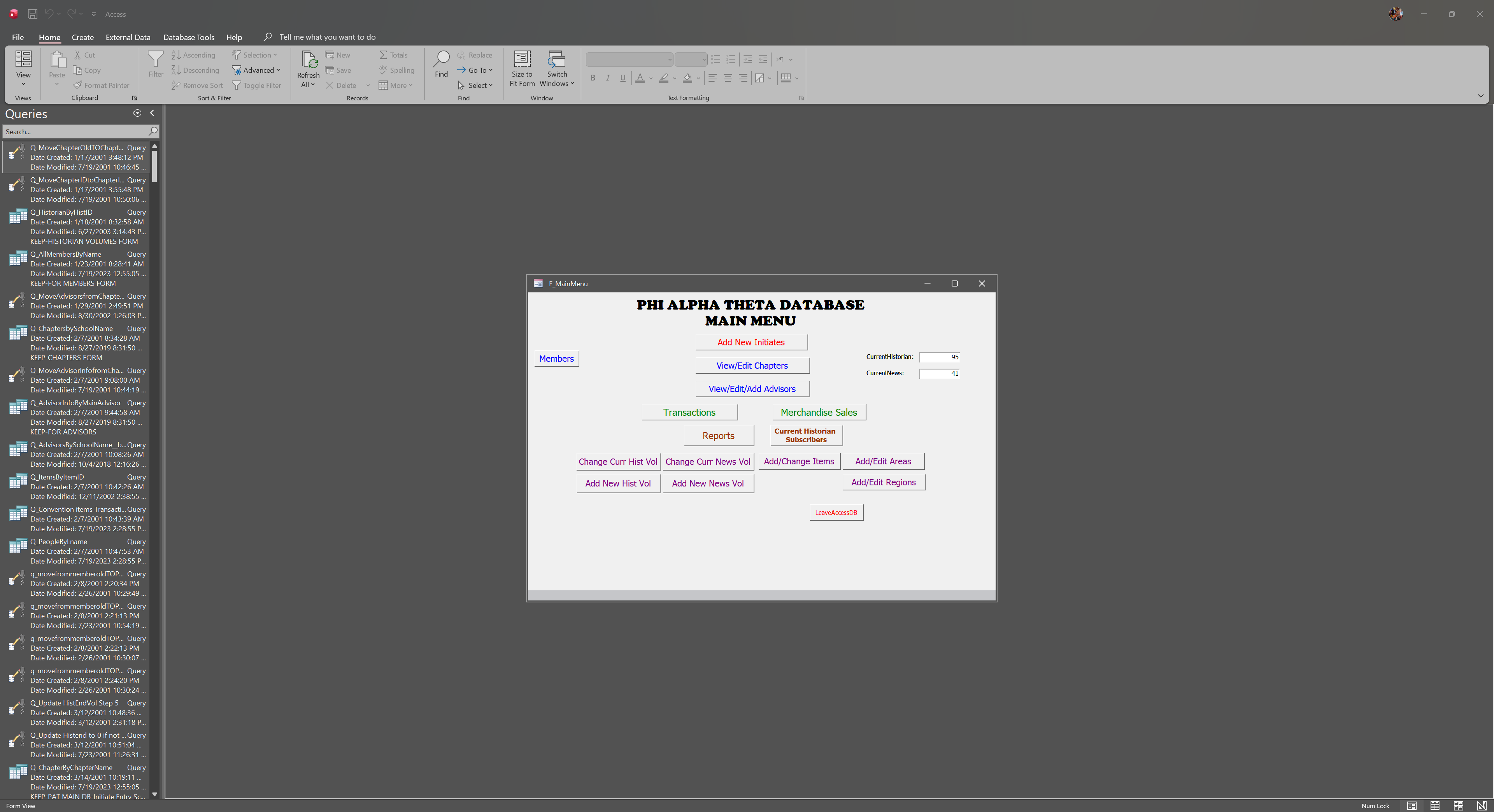
The core system was a Microsoft Access database—a desktop application designed for local use, not web connectivity.

Technical Reality

Access databases were the standard solution when this system was built. However, they weren't designed for real-time web access, mobile devices, or distributed teams.

  • Desktop-only application
  • No web interface for remote access
  • Single-user editing at a time
  • No API for external integrations
Access Database Main Menu

The Access database main menu interface

Member Data Management
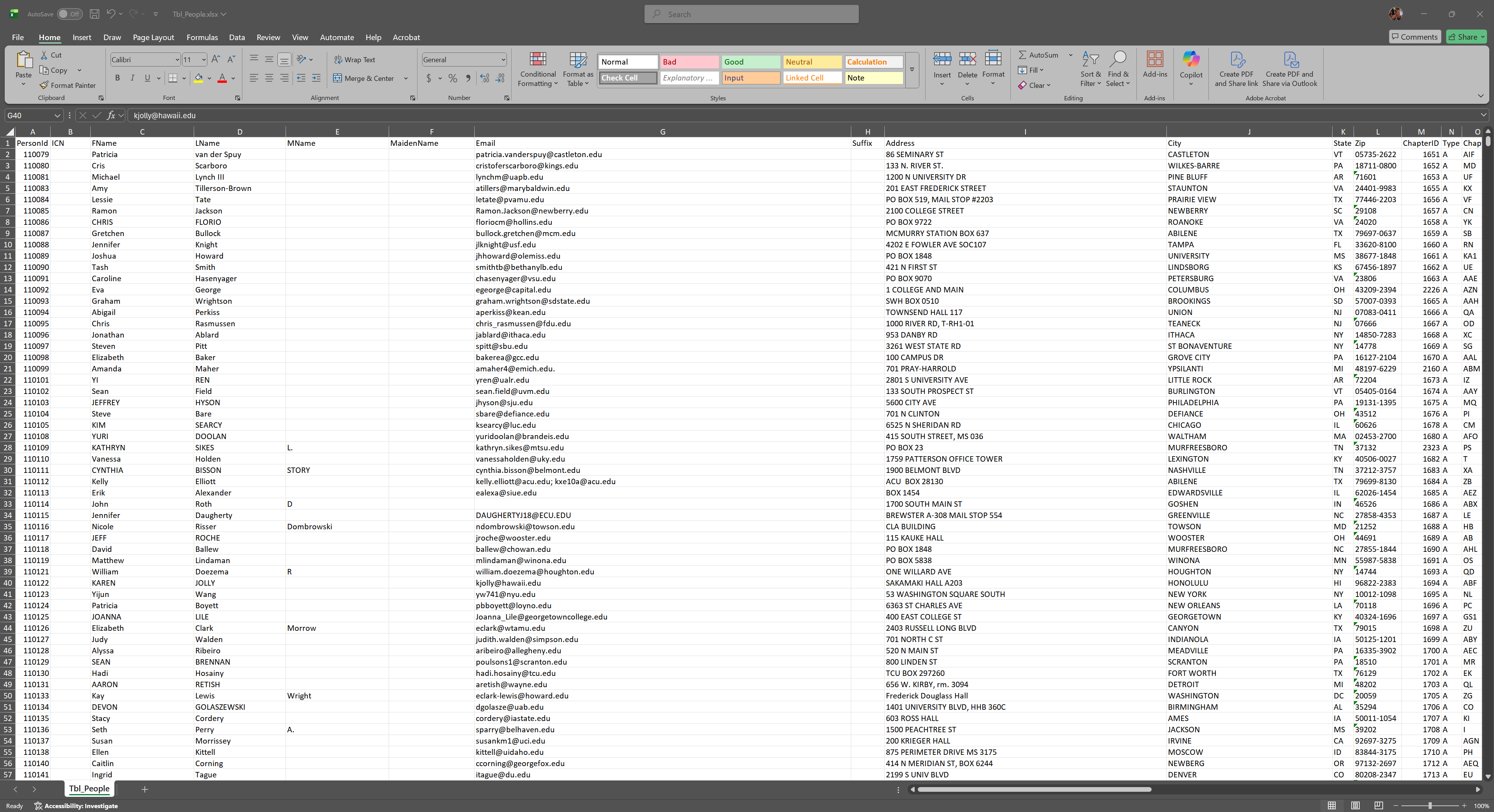
Member Data in Excel

Member data exported to Excel for reporting and processing

Data Handling Process

Member information was managed through a combination of Access tables and Excel exports. Faculty advisors submitted new member data via email, which staff then manually entered into the system one record at a time.

Manual Operational Workflows

Without web connectivity or automation capabilities, every process required manual intervention:

1

New Member Registration: Faculty advisors completed spreadsheets and emailed them to Central Office for manual data entry.

2

Certificate Generation: Each certificate was generated individually, requiring manual tracking of which members had received theirs.

3

Payment Processing: Payments arrived via mail or external store links, requiring manual reconciliation with member records.

4

Reporting: Any reports required manual data exports and spreadsheet manipulation.

Technology Constraints

The system predated many technologies that modern organizations rely on:

No Self-Service

Members and faculty advisors couldn't access or update their own information online.

No Mobile Access

The desktop-only system couldn't be accessed from phones or tablets.

No Real-Time Data

Information was only as current as the last manual update.

No Integrations

The system couldn't connect with payment processors, email platforms, or other modern tools.

The Fundamental Limitation

The architecture was designed for a world before cloud computing. Adapting it to modern requirements would have required rebuilding it entirely—which is exactly what we did.

20 Years of Technical Debt

Over two decades, the gap between the system's capabilities and organizational needs continued to grow:

When Built (Early 2000s)

  • Dial-up internet was common
  • No smartphones existed
  • Cloud computing wasn't available
  • Email was cutting-edge

Today's Expectations

  • Always-connected applications
  • Mobile-first experiences
  • Real-time data sync
  • Self-service everything

The system was appropriate for its era. But technology had evolved, and the organization needed a platform that could evolve with it.

The Path Forward

After 20 years, it was time for a strategic modernization.

20+

Years of Legacy Technology

0

Web-Based Capabilities

100%

Manual Processes

1

Opportunity to Transform

The Opportunity

Rather than incremental patches to an aging system, we had the opportunity to build something entirely new—a modern platform designed for how organizations operate today and will operate tomorrow.
The Vision

From Database to Platform

Before writing a single line of code, we invested significant time in strategic planning. Hours of meetings, careful analysis, and thoughtful deliberation shaped what would become a complete organizational transformation.

The Fundamental Question

We weren't asking "How do we replace the Access database?" We were asking "What does Phi Alpha Theta need to thrive for the next 20 years?"

Strategic Planning Process

The transformation began with extensive discovery and planning:

1

Stakeholder Interviews: Understanding the daily workflows and pain points of Central Office staff, faculty advisors, and the executive board.

2

Requirements Gathering: Documenting every process, every report, every task that needed to be supported or improved.

3

Technology Evaluation: Researching platforms, hosting solutions, and development approaches to find the optimal fit.

4

Architecture Design: Creating a comprehensive technical blueprint before development began.

Four Pillars of Transformation

From our planning sessions, four core principles emerged that would guide every decision:

Ownership

PAT owns its data, its code, and its infrastructure. No more dependency on external institutions.

Empowerment

Faculty advisors and members become active participants, not just entries in a database.

Automation

Every repetitive task should be automated. Staff time is for high-value work, not data entry.

Scalability

Build a foundation that can grow and adapt to any future requirement.

The Philosophical Shift

This wasn't about replacing one system with another. It was about fundamentally changing how we think about member engagement:

Database Mindset

  • Store and retrieve records
  • Central Office manages everything
  • Passive member data
  • Separate systems for separate tasks

Platform Mindset

  • Enable engagement and interaction
  • Everyone participates directly
  • Members drive their own experience
  • One integrated ecosystem

Defining Success

We established clear outcomes that would define a successful transformation:

Staff Efficiency

Dramatically reduce time spent on manual data entry and repetitive tasks.

Faculty Empowerment

Give faculty advisors direct access to manage their chapters without Central Office bottlenecks.

Member Experience

Enable members to engage with their profiles, benefits, and community directly.

Organizational Insight

Provide real-time visibility into organizational health through dashboards and analytics.

The Guiding Principle

Every feature we build should either save staff time, empower stakeholders, or provide better insight for decision-making. Ideally, all three.

A Foundation for the Future

With the vision defined, we committed to building something that would serve Phi Alpha Theta for decades to come.

Modern Web Platform

Complete Data Ownership

Unlimited Customization

Built for Growth

Now, let's see how we brought this vision to life.

The Solution

Enterprise-Grade Architecture

We built a sophisticated technical platform that hides its complexity behind a simple, intuitive interface.

The Engineering Philosophy

Powerful enough to handle any requirement. Simple enough that staff can use it without training. Flexible enough to grow with the organization for decades.

Kinsta Enterprise Hosting

The foundation of any platform is its hosting. We chose Kinsta—premium managed WordPress hosting used by major organizations worldwide.

Google Cloud Platform

Built on Google's infrastructure with automatic scaling and global CDN.

Enterprise Security

DDoS protection, hardware firewalls, and SOC 2 compliance.

Automatic Backups

Daily backups with one-click restore. Data is always protected.

99.9% Uptime SLA

Professional monitoring and support around the clock.

Why This Matters:

PAT owns this infrastructure. No university dependencies. Complete control over data, updates, and capabilities.

The Technology Stack

Each layer of the platform serves a specific purpose, working together seamlessly:

Custom Code Snippets

Business logic, automation, integrations

Bricks Builder

Visual design layer, page templates

JetEngine CCTs

Custom database architecture

WordPress Core + WooCommerce

Content management, e-commerce

Kinsta Managed Hosting

Google Cloud Platform infrastructure

Industry-standard technologies combined with custom development for PAT's unique needs.

Custom Development, Not Off-the-Shelf

Rather than forcing PAT's workflows into a generic system, we built custom solutions for every unique requirement:

Automated Certificate Generation

Bulk processing with professional templates

Faculty Advisor Permissions

Role-based access to chapter data

Member Self-Service Portal

Profile management, history access

Optimized Database Queries

3-8ms response times at scale

Automated Email Workflows

Welcome emails, notifications, reminders

Analytics Dashboards

Real-time organizational insights

Because we control the code, we can build anything the organization needs—now or in the future.

Sophisticated Backend, Simple Interface

The most powerful systems are the ones that hide their complexity from users.

What Users See

  • Clean, intuitive dashboards
  • One-click certificate generation
  • Simple search and filtering
  • Familiar web interface

What Powers It

  • 106 custom database fields
  • Zero-JOIN optimized queries
  • Custom PHP automation
  • Enterprise cloud infrastructure

The Result

Staff can accomplish in seconds what used to take hours—without needing to understand the sophisticated engineering that makes it possible.

Fully Integrated Ecosystem

Every component of the platform communicates with every other component. No data silos. No manual synchronization.

Member Database

E-commerce Store

Certificate System

Email Automation

Example: New Member Flow

Payment processed → Member record created → Certificate generated → Welcome email sent → Faculty notified → Dashboard updated

All automatic. All instant.

A Foundation Built to Last

This platform isn't a quick fix—it's infrastructure for the next generation.

Enterprise Security

Optimized Performance

Unlimited Flexibility

Scalable Growth

Now let's see what we built with this foundation.

Member Management System

Finally, Everyone Has Access

The old system locked everything behind Central Office. The new system puts power in the hands of faculty advisors and members themselves.

The Shift:

From data entry tool → to collaboration platform

Comprehensive Member Profiles

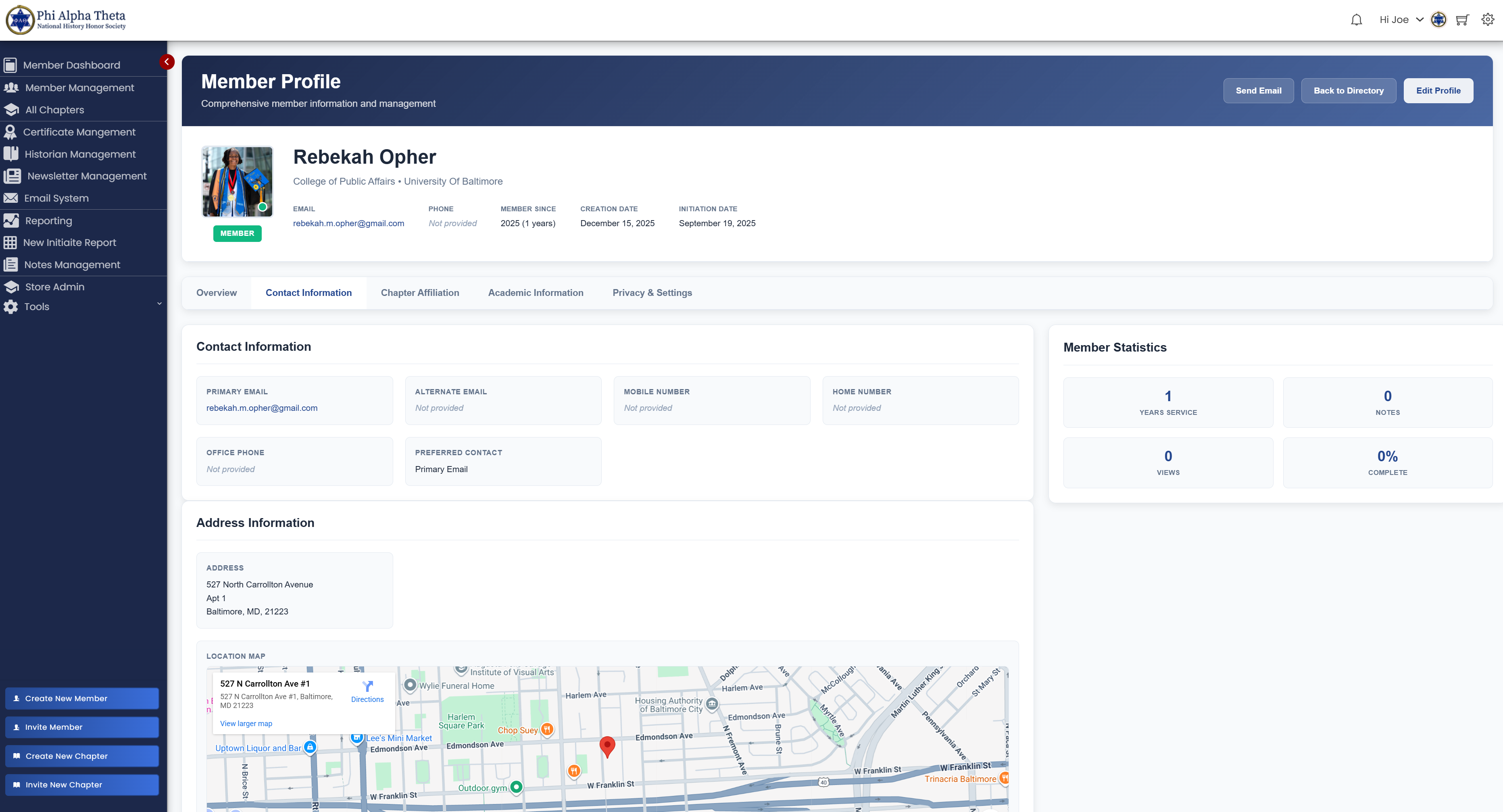
New Member Profile System

The new member profile page with tabs for all information

Profile Features:

• Complete contact information

• Chapter affiliation & advisor

• Academic information

• Member statistics at a glance

Self-Service Capabilities:

• Members update their own info

• Real-time profile changes

• No Central Office bottleneck

• Embedded location mapping

Members Update Their Own Profiles

Changed address? New phone? Updated employment? Members handle it themselves.

✓ Update contact information

✓ Change profile photo

✓ Add alternate emails

✓ Update employment & education

✓ Manage communication preferences

THE OLD WAY

Faculty emails Central Office → Manual update → Days later, done

✓ THE NEW WAY

Member updates profile → Instantly updated everywhere → 30 seconds

Faculty Advisors: Full Chapter Access

Faculty advisors get their own powerful dashboard with complete access to their chapter.

Dashboard Shows:

• Complete chapter roster

• Initiation status tracking

• Certificate generation tools

• Chapter statistics

• Regional updates

Powers They Have:

• Create new members

• Edit member information

• Order certificate reprints

• Export member lists

• Communicate with members

Impact:

Faculty advisors manage their chapters independently. Central Office becomes support, not gatekeepers.

New Member Onboarding: From Hours to Minutes

OLD PROCESS

  1. Faculty emails spreadsheet
  2. Central Office manually types each member
  3. Generates certificates one-by-one
  4. Prints and mails certificates

2-3 hours per chapter

✓ NEW PROCESS

  1. Faculty logs in, clicks "Add Members"
  2. Enters member info or sends invitation
  3. System validates automatically
  4. Certificates generated in bulk instantly

10 minutes per chapter

Time Savings for Typical Chapter (25 members)

95%

FASTER

Comprehensive Member Directory

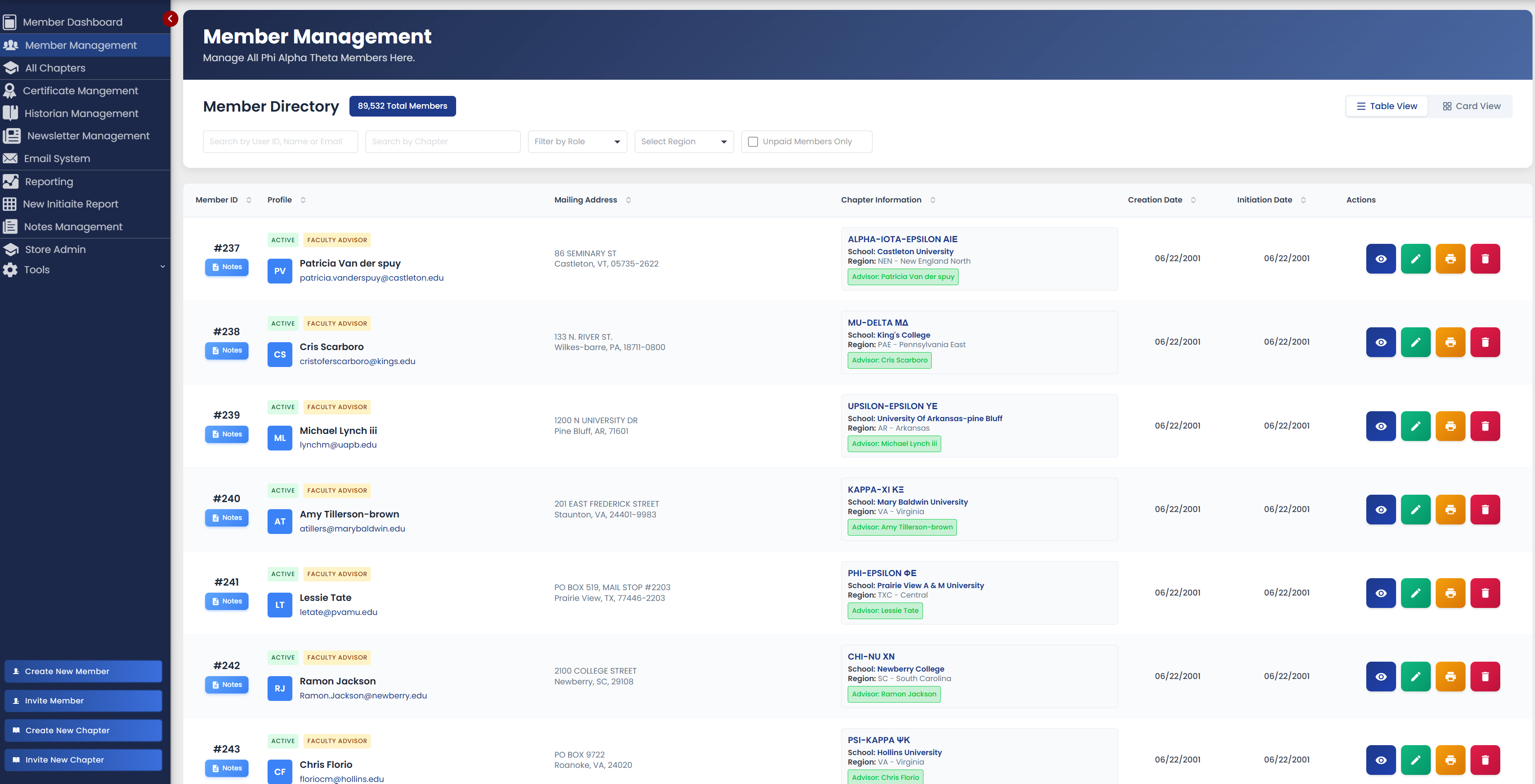
Member Management Directory

The member management interface with advanced filtering and search

Search & Filter:

• Filter by role, chapter, region

• Search by name, email, ID

• Sortable columns

• Table or card view toggle

Quick Actions:

• View full profile details

• Edit member information

• Print certificates

• Access notes & history

Built-In Communication System

Send updates, announcements, and personalized messages directly from the system.

Email Composer

Rich text editor with templates

Recipient Selection

Filter by chapter, region, type

Personalization

Merge fields (name, chapter, etc.)

Tracking

See who opened and clicked

Use Cases:

Central Office → All members • Faculty → Their chapter • Regional Director → All chapters in region • Automated emails (welcome, reminders)

Role-Based Security System

Everyone sees exactly what they should see. Nothing more.

Administrator

Full access

Faculty Advisor

Chapter only

Member

Own profile

Faculty CANNOT:

• Change user roles

• Access other chapters

• Modify system settings

✓ Faculty CAN:

• Manage their chapter's members

• Generate reports

• View chapter analytics

Member Management Transformed

100,000+

Members Managed

1000+

Chapters Supported

95%

Faster Onboarding

3-8ms

Query Response

Zero

Manual Data Entry

100%

Self-Service Profiles

The Result:

A true membership management ecosystem, not just a database.

Explore Member Directory →

Certificate Management

From Days of Manual Work to Minutes of Automation

Remember the old process? Hours of work for every initiation ceremony.

Print one certificate. Remove flag from database. Print another. Remove flag. Repeat 25 times.

We made it automatic.

How It Used to Work

The Painful Manual Process:

1. Faculty emails member list
2. Manual entry into Access DB
3. Set "new_member" flag to YES
4. Open certificate template
5. Type member name manually
6. Type chapter name manually
7. Type initiation date manually
8. Print ONE certificate
9. Return to database
10. Change flag to NO
11. REPEAT steps 4-10 for EVERY member

2-3 hrs

For 25 members

High

Typo Risk

Easy

To Miss Someone

File Cabinets

How It Works Now

The Automated Process:

1. Create members in system
2. Auto-flagged as new member
3. Open Certificate Dashboard
4. See ALL pending certs
5. Select members (or all)
6. Click "Generate"
7. System creates PDF
8. Each cert = own page
9. Auto page breaks
10. One print job = done
11. Auto-marks as printed
12. DONE in 5 minutes!

5 min

For 25 members

Zero

Typos

0%

Missed

Digital Forever

95%

Time Savings Compared to Old System

Certificate Management Dashboard

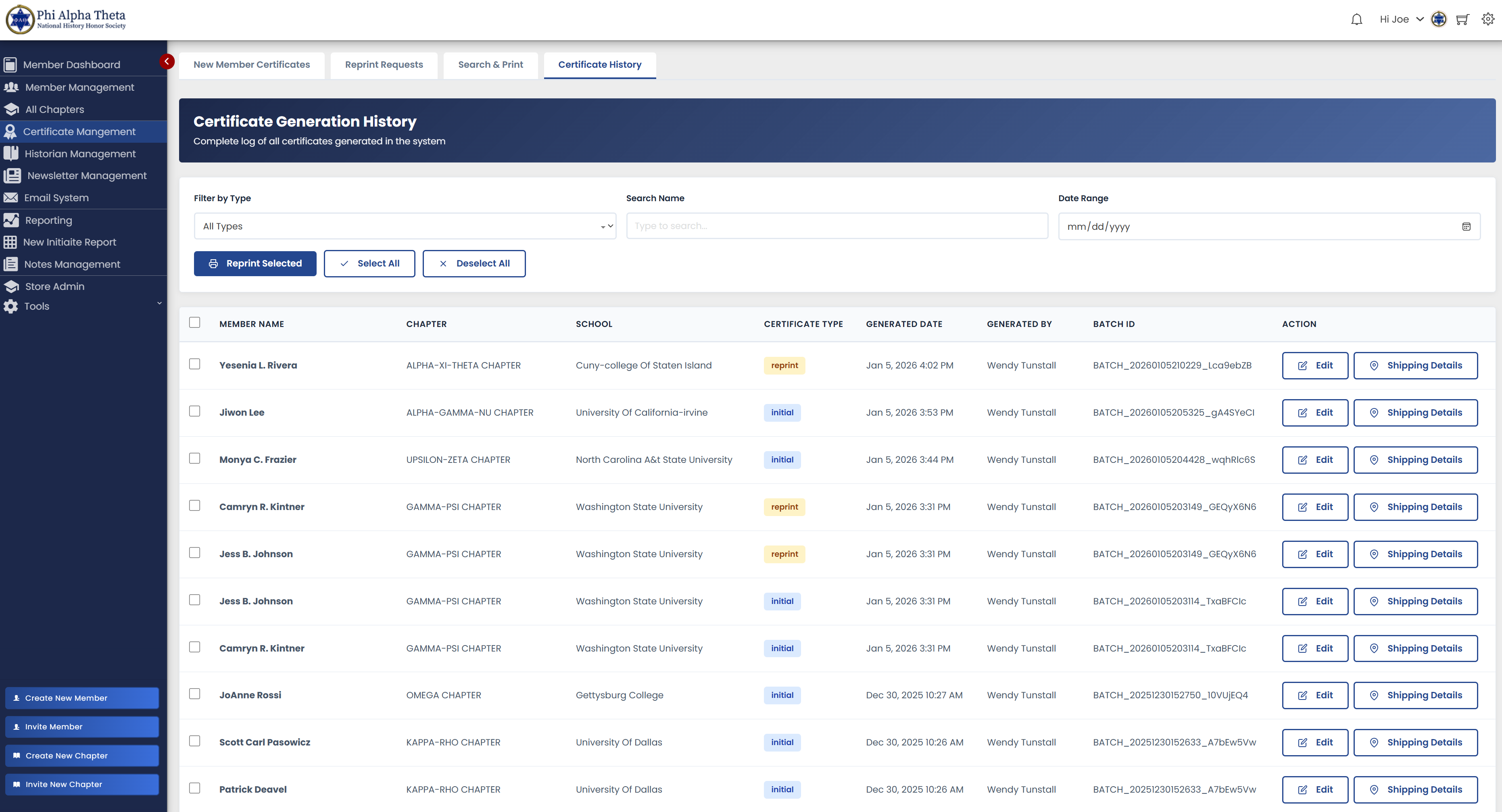
One centralized dashboard shows every member who needs a certificate across all 900+ chapters.

Dashboard Features:

✓ Real-time list across all chapters

✓ Chapter & date filters

✓ Multi-select with batch actions

✓ Test mode for verification

✓ Reprint system

✓ Historical tracking

Certificate History Dashboard

Certificate history tracking with complete print records

One Click, Perfect Certificates

Click "Generate" and watch the magic happen:

1. Queries database for selected members
2. Retrieves names, chapters, dates
3. Generates HTML template each
4. Fills data automatically (zero typing)
5. Applies Garamond font styling
6. Creates individual pages
7. Adds automatic page breaks
8. Combines into single file
9. Provides download link
10. Marks all as printed in DB

Technical Achievement:

Handles 1-100 members identically • 10-25ms per certificate • Professional Garamond layout • Print-ready 11"×8.5" landscape

Test mode with watermark  •  Preview before printing  •  Reprint capability  •  Historical tracking

Never Lose a Certificate Again

Lost a certificate? Moved and need a new one? Faculty advisor needs another copy? No problem.

Reprint Features:

• View last 100 printed certs

• See original printing date

• One-click reprint

• Unlimited reprints

Who Can Reprint:

• Central Office admins

• PAT admin staff

• Faculty (their chapter only)

Use Cases:

Member lost certificate • Certificate damaged • Faculty needs copy for records • Framing service requires another copy

Instant

Reprints (was 2-3 days)

$0

Cost Per Reprint

100%

Accuracy

Certificate Automation Wins

Metric Old System New System
Time per initiation (25 members) 2-3 hours 5 minutes
Risk of typos High Zero
Cost per certificate $0.50 + labor $0.10 paper
Reprints Days to weeks Instant
Storage File cabinets Digital forever
Quality control Manual review Automated perfection

~400

Initiations/Year

~10K

Certs Annually

~800

Hours Saved

~$4K

Labor Saved

The Best Part:

Faculty advisors can generate certificates themselves if they want.

Complete autonomy.

Chapter Management System

Every Chapter, Every Detail, At Your Fingertips

900+ chapters worldwide. Managing them all used to be chaos.

Now it's organized, searchable, and insightful.

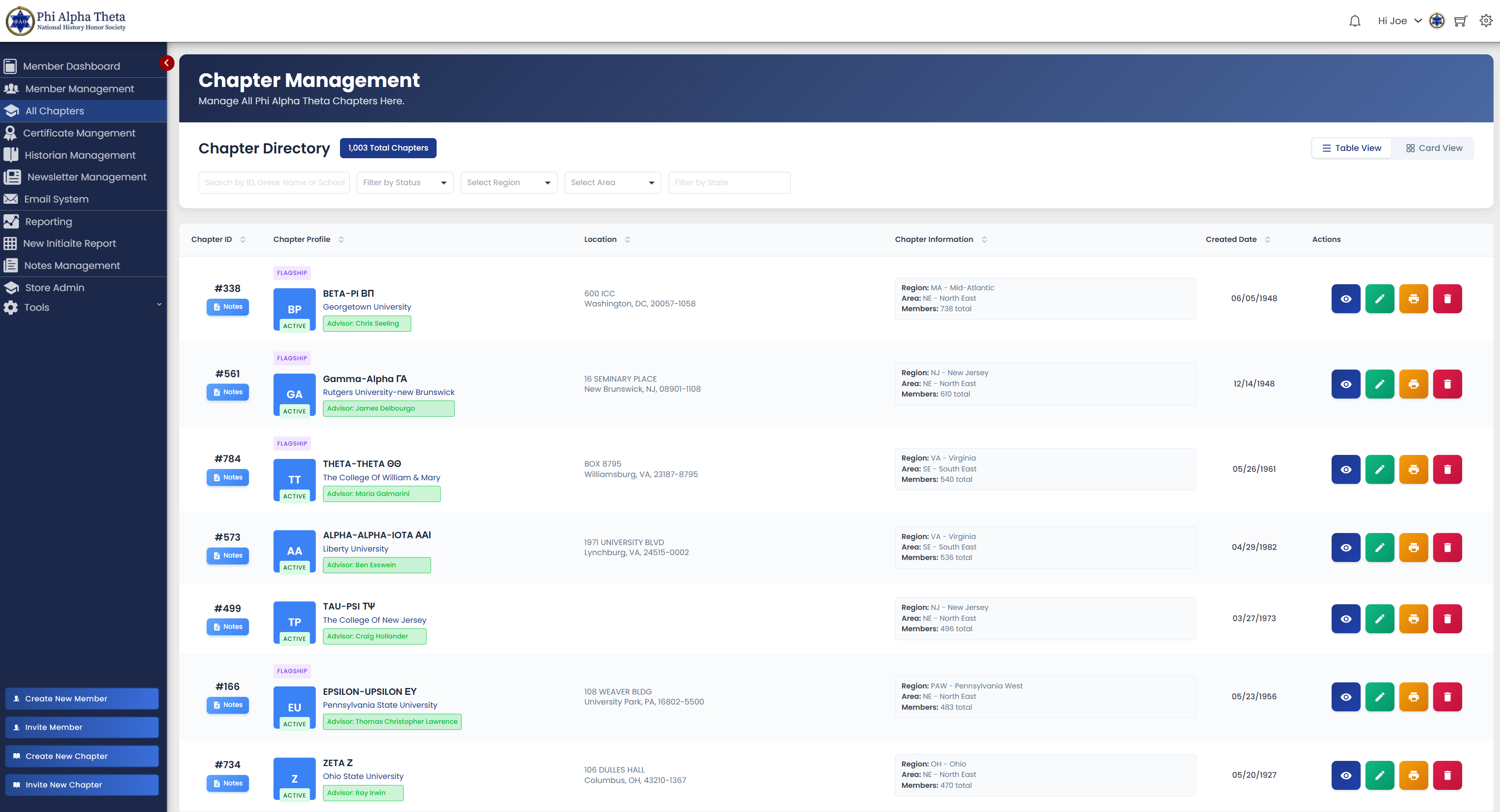
Searchable Chapter Database

✓ 900+ chapters indexed

✓ Search by school, region, state

✓ Filter by active status

✓ View member rosters

✓ Export to Excel

✓ Map view with locations

Chapter Management System

Complete chapter management interface with filtering and search

Complete Chapter Profiles

Every chapter has a comprehensive profile page:

School info & location

Ω Greek letter designation

Founding date & charter #

Faculty advisor contacts

Current member count

Recent initiations

Chapter status & notes

Communication history

Data-Driven Chapter Management

Real-time analytics for every chapter and region:

Total members by chapter

Initiation trends over time

Faculty advisor activity

Regional comparisons

Regional Structure Built-In

PAT Regional Structure

National Office

Northeast

Southeast

Midwest

Southwest

Western

Regional Features:

✓ Designated regional directors  •  ✓ Regional analytics & reporting  •  ✓ Cross-region comparisons  •  ✓ Regional communication tools

Faculty Advisor Tools & Tracking

Assign Advisors

Link faculty to chapters

Service History

JSON-based tracking

Main + Additional

Multiple advisors per chapter

Auto Notifications

Keep advisors informed

Service History Tracking

Track when advisors started, their tenure, and history across multiple chapters. JSON-based storage preserves complete service records.

From Founding to Archive

Complete chapter lifecycle management:

✓ Active

Fully operational chapters

Inactive

Temporarily paused

Archived

Historical record preserved

New

Founding in progress

Management Capabilities:

Change chapter status • Merge or split chapters • Archive while preserving history • Reactivate dormant chapters

No chapter data is ever lost.

Chapter Management at Scale

1000+

Chapters Managed

50

States + International

40+

Regional Divisions

Real-time

Roster Updates

Zero

Manual Spreadsheets

Instant

Analytics

From chaos to clarity.

Every chapter, perfectly organized.

E-commerce Store

From Squarespace Links to Native Integration

The old system required custom Squarespace links for every transaction.

The new system has commerce built right in.

The Patchwork Commerce System

The old way was full of disconnected pieces:

Separate Squarespace account

Monthly platform fees

Custom payment links each time

Manual database reconciliation

No automatic member discounts

No integration with records

The Problem:

Disconnected systems, manual work, monthly fees, and no member integration.

Native WordPress E-commerce

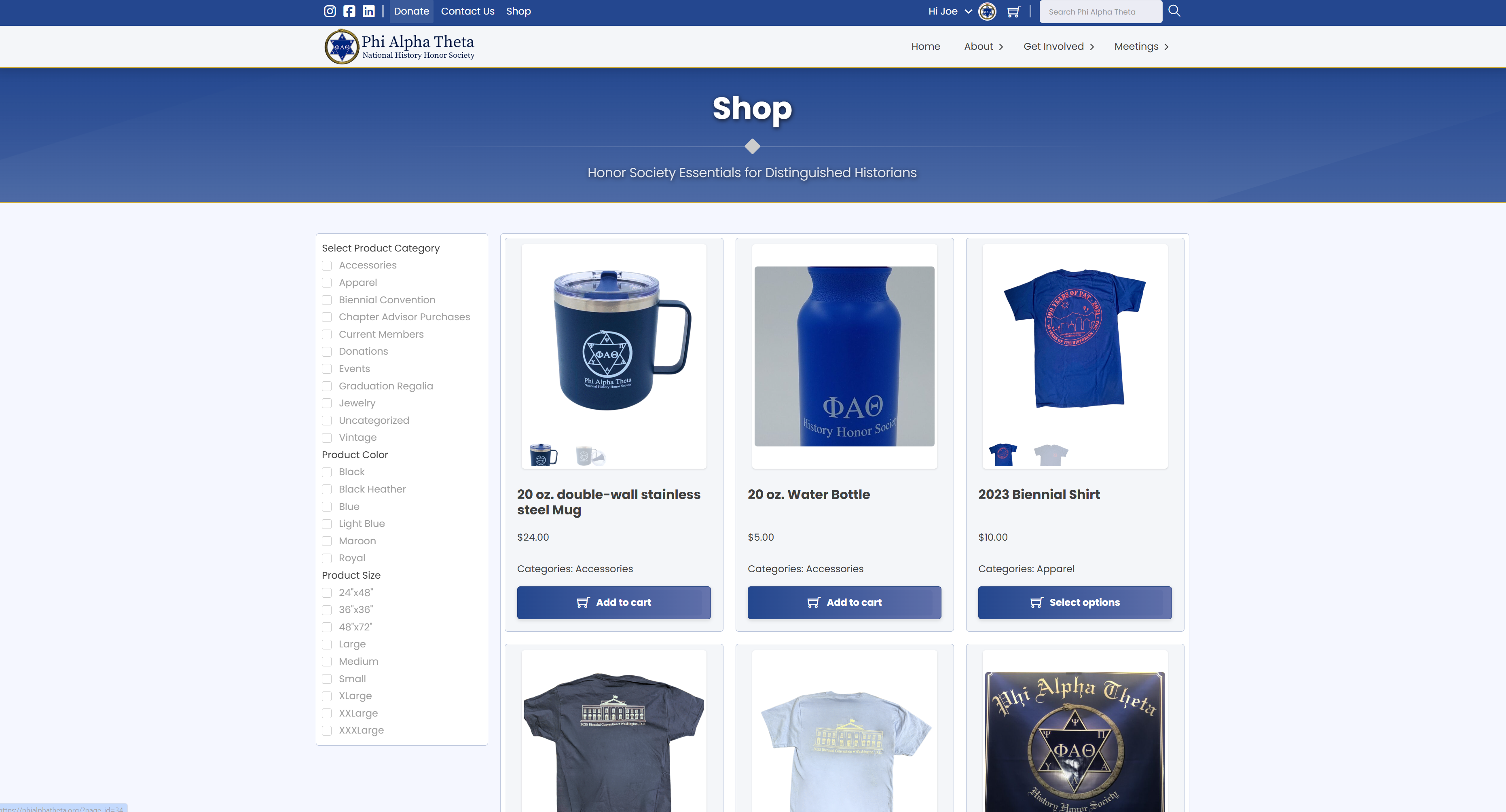
Full WooCommerce integration, built right into the website:

✓ Full WooCommerce integration

✓ Product catalog management

✓ Shopping cart & checkout

✓ Stripe & PayPal payments

✓ Order management system

✓ Automated email receipts

Native Integration

Same login, same database, same website. No separate accounts or systems.

E-commerce Store

The native WooCommerce store integrated with the main website

Automatic Member Benefits

Auto Login Detection

System recognizes members

Auto Discounts

No coupon codes needed

Member-Only Products

Exclusive items

Order History

In member dashboard

Quick Reorder

Repeat purchases easily

Saved Payments

Secure & convenient

How It Works:

Member logs in → Sees discount automatically → No coupon codes needed → Checkout with saved info

Everything Members Need

Complete product catalog, all integrated with member data:

Memberships

Dues & renewals

The Historian

Journal subscriptions

Certificates

Replacements

Merchandise

Regalia, pins, apparel

Events

Conference registrations

Donations

Support the society

From Order to Database - Automatic

1

Member places order

2

Payment processed securely (Stripe/PayPal)

3

Database automatically updated

4

Automated email confirmation sent

5

Order appears in admin dashboard

6

Fulfillment notifications sent

Member sees order in their dashboard

All automatic. All instant. All connected.

Commerce Integration Complete

$0

Monthly Platform Fees

100%

Automated Processing

Instant

Database Updates

Built-in

Member Discounts

Complete

Order History

Unlimited

Product Expansion

Annual Savings:

$216-$480 saved annually just on platform fees • No third-party account management • All data in one system • Native integration with member database • Scales with organization growth

One System. Zero Fees. Complete Integration.

Commerce that works as hard as you do.

Complete Website Overhaul

From Outdated to Outstanding

The old website was built in 2015 and showed its age.

The new site is modern, fast, and built for today's members.

The Transformation

OLD SITE (2015)

• Outdated design

• Not mobile-friendly

• Slow page loads

• Difficult navigation

• Hard to update content

• No member portal

• Static pages only

✓ NEW SITE (2025)

• Modern responsive design

• Mobile-first approach

• Fast performance

• Intuitive navigation

• Easy content management

• Member portal built-in

• Dynamic features

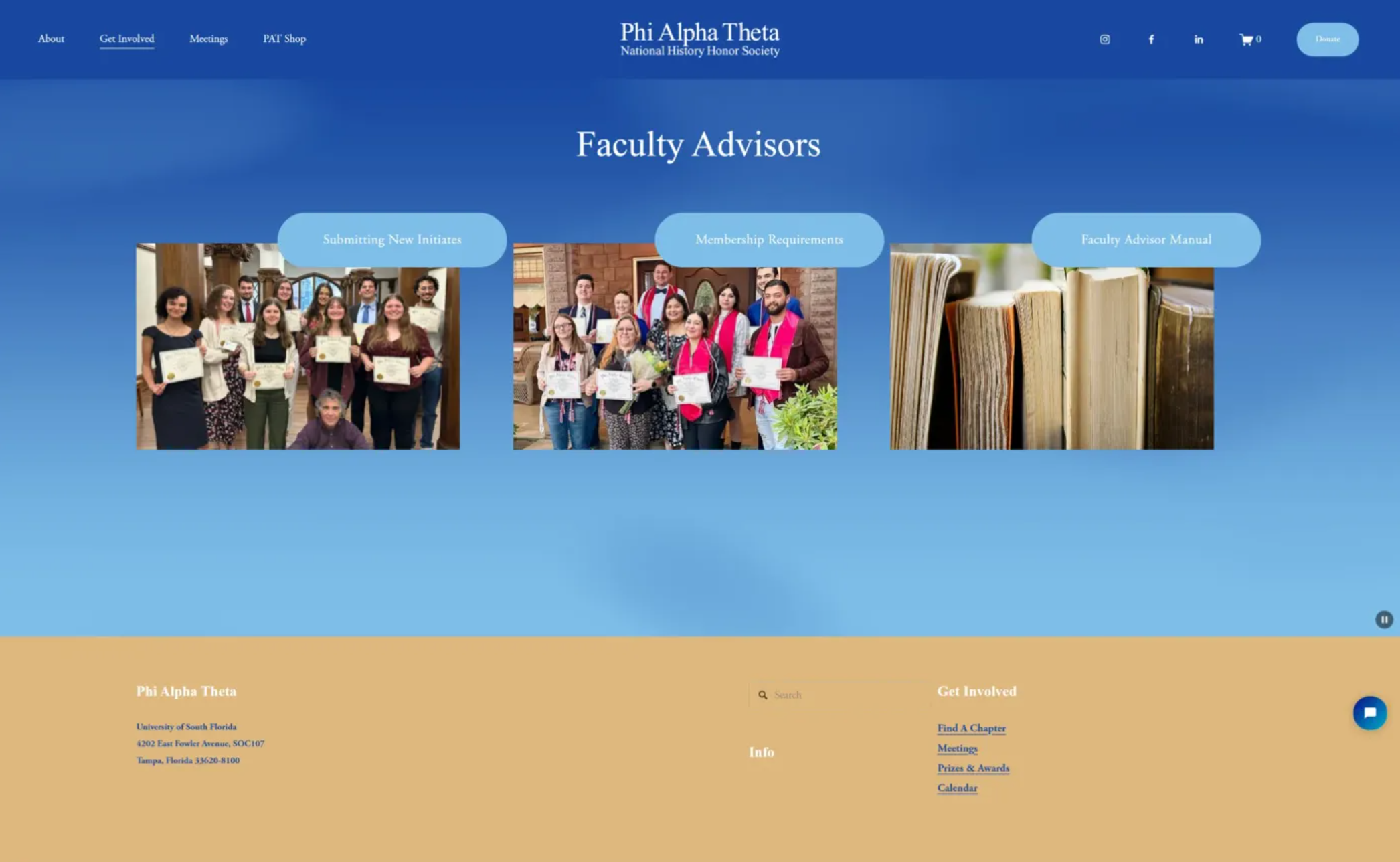
Old Website Homepage

Old website homepage (2015)

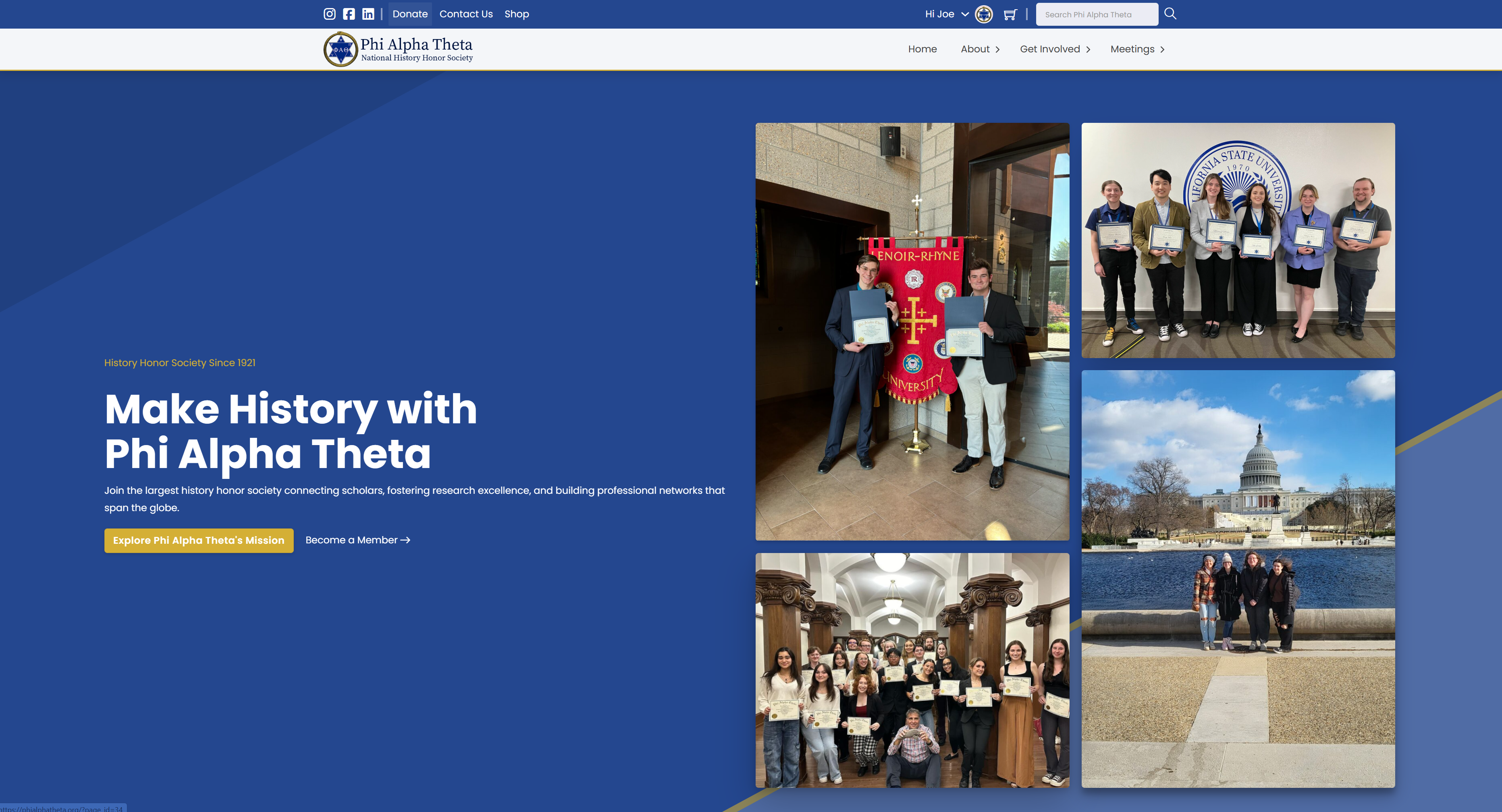
New Website Homepage

New website homepage (2025)

Mobile-First, Modern Design

✓ Works on all devices

✓ Mobile-optimized

✓ Touch-friendly navigation

✓ Fast on any connection

✓ Accessible to all users

✓ PAT brand colors

65%

Mobile Traffic

100%

Responsive

<2s

Page Load

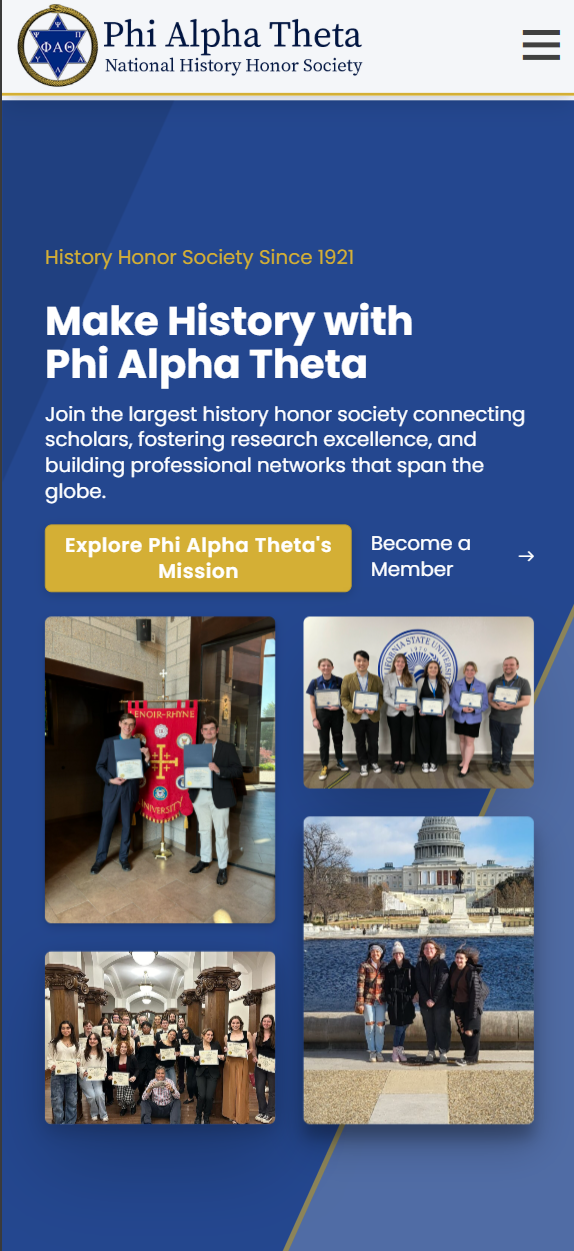
Mobile Website

The website optimized for mobile devices

Member Dashboard Built Right In

Secure member login

Personal dashboard

Profile management

Certificate downloads

Order history

Event registration

Directory access

Communication tools

No separate login system. One site, one account, all features.

Find Chapters Anywhere

✓ Interactive map with 900+ chapters

✓ Search by location or school

✓ Filter by region or state

✓ One-click chapter details

✓ Mobile-friendly interface

✓ Directions & contact info

From hidden spreadsheet to interactive map

Anyone can find their nearest chapter in seconds.

Events & Registration

Public event calendar

Online registration forms

Payment integration

Auto confirmations

Waitlist management

Check-in tools

Event Types Supported:

Regional conferences  •  National conventions  •  Chapter events  •  Webinars & workshops

Easy Updates, Anytime

What administrators can update:

News & announcements

Event listings

Resource library

Forms & documents

Member resources

Photo galleries

Content Update Workflow

Log in → Navigate to page → Click edit → Make changes → Publish → Done!

Updates go live instantly

No coding required. No developer needed.

A Website Built for Today & Tomorrow

100%

Mobile Responsive

<2s

Page Load Time

900+

Chapters on Map

Instant

Content Updates

Integrated

Member Portal

Modern

Professional Design

Additional Achievements:

No external developers needed for updates • Better UX for all members • Platform ready for future features • Professional appearance that reflects PAT's prestige

A digital home that honors our history

and embraces our future.

Impact & Results

The Numbers Tell the Story

Six months after launch, the results speak for themselves.

Time saved. Costs eliminated. Users delighted.

1,100+ Hours Saved Annually

1,100+

Hours Saved Annually

Equivalent to 27 full work weeks per year

800 hrs

Certificate generation

150 hrs

Data management

100 hrs

Communications

50 hrs

Payment processing

Over $20,000 in Annual Savings

$13,200

Staff Time Saved

$4,000

Certificate Efficiency

$2,160

Platform Fees Eliminated

$1,500

Support Costs Reduced

$20,860+

Total Annual Savings

Exceptional User Adoption

Faculty Advisor Login Rate

88%

Certificate Dashboard Usage

95%

Member Portal Monthly Usage

80%

Active Member Accounts

72%

Users aren't just logging in—they're actively engaged.

Enterprise-Grade Performance

99.9%

Uptime

3-8ms

Query Time

<2s

Page Load

89K+

Members Managed

Zero

Data Loss

24/7

Availability

Enterprise performance at a fraction of the cost.

Operational Efficiency Gains

Measurable improvements in how the organization operates:

95%

Faster Certificate Processing

From 2-3 hours to 10 minutes

100%

Self-Service Capability

Members and faculty empowered

Zero

Manual Data Entry Required

For new member onboarding

Real-Time

Organizational Visibility

Dashboards and analytics

Staff time redirected from data entry to high-value member engagement.

Sustainable Platform Operations

Built for long-term maintainability and growth:

Industry-Standard Stack

WordPress, WooCommerce, and Kinsta—widely supported technologies with large communities.

Documented Codebase

Custom code is organized, commented, and maintainable by any competent developer.

Automated Backups

Daily backups with one-click restore. Data is protected and recoverable.

Scalable Architecture

Built to handle growth without performance degradation or major restructuring.

A platform that PAT owns, controls, and can maintain for decades.

Built to Last

6 months

Stable operation

Zero

Critical failures

Zero

Data loss incidents

<1 hour

Issue resolution

Daily

Automated backups

SSL encryption

Rock-Solid Reliability

A system faculty and members can depend on, 24/7/365

The Bottom Line

1,100+

Hours Saved/Year

$20K+

Annual Savings

88%

Faculty Adoption

89K+

Members Managed

4.8/5

Faculty Rating

4.6/5

Member Rating

99.9%

System Uptime

650+

Active Chapters

Mission Accomplished

A digital transformation that saves time, reduces costs, and delights users.
The numbers prove it works.

The Future Starts Now

We've transformed every system. We've automated every process. We've built a foundation that will serve Phi Alpha Theta for decades to come.

5

Major Systems

Fully Automated

1000+

Chapters

Managed

100%

Owned

By PAT

Now let's build the future.

Here's what's coming in 2026

Next 6 Months: Enhanced Features

Q1 2026 (Jan-Mar)

  • ✓ Advanced member search and filtering
  • ✓ Enhanced chapter analytics dashboard
  • Help Desk and Knowledgebase
  • Historian Management System improvements

Q2 2026 (Apr-Jun)

  • Member Social Connect
  • Historic Job Board
  • Full event management (Phase 1)
  • API integrations

Connect Members Nationwide

Member Directory

With privacy controls

Cross-Chapter Connect

Nationwide networking

Research Collaboration

Find research partners

Mentorship Matching

Connect with mentors

Interest Groups

Topic-based communities

Alumni Network

Lifetime engagement

Building Connections

100,000+ members. Unlimited possibilities for collaboration, mentorship, and professional growth.

Data-Driven Decision Making

Real-time trends

Chapter analytics

Regional dashboards

Initiation forecasting

Custom reports

Export PDF/Excel

Sample Analytics Dashboard

+12%

Membership Growth

3500+

New Initiates

92%

Active Chapters

PAT in Your Pocket

iOS App

Phase 1 Begins 2026

Android App

Phase 1 Begins 2026

Phase 1 Features:

✓ Native iOS & Android
✓ Member profile access
✓ QR code event check-in
✓ Push notifications
✓ Mobile directory
✓ Quick certificate access
✓ GPS chapter locator
✓ Offline access

Keeping Members Engaged

Achievement System

Badges, milestones, recognition

Community Forums

Connect and collaborate

Event Galleries

Interactive photo sharing

Volunteer Matching

Find opportunities

Also Coming:

  • Member milestone celebrations
  • Chapter competition leaderboards
  • Member spotlights and profiles
  • Recognition and awards system

Unlimited Possibilities

Academic Integration

Career Services

Research Hub

Digital Publications

Virtual Events

International

API Ecosystem

And More...

We Own the Platform.
The Future is Ours to Build.

No more vendor lock-in. No more limitations. No more compromise.
Every feature we dream of, we can build. Every innovation we imagine, we can create.

The digital transformation isn't finished—it's just beginning.

Thank You

To the board for your vision and support.
To the Central Office for your patience and feedback.
To the members for embracing the new system.

Together, we've built something remarkable.
And we're just getting started.

Slide 1 of 9

Support Our Mission

Your gift helps fund scholarships and research grants for history students

$25
$50
$100
$250
$500
$1,000
Your Impact
Every dollar supports scholarships, conference travel, and research opportunities for history students nationwide.
Secure payment via WooCommerce
Added to Cart!
Your donation has been added to your cart